
Download Orange N75 Original Firmware Stock Rom Without Password
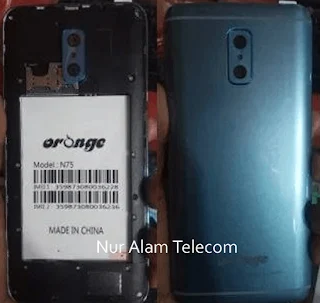
Download Orange N75 Original Firmware Stock ROM – Without Password
If your Orange N75 is dead, hanging on the logo, or facing software corruption, you need the correct original firmware to bring it back to life. We are providing the Orange N75 Original Firmware Stock ROM which is 100% Tested by Nur Alam Telecom.
This firmware is completely free to download, and there is No Password required to extract or use it. It is the perfect solution for mobile repair technicians and advanced users looking to restore the device to its original working condition.
📁 File Information
| Details | Information |
|---|---|
| Brand | Orange |
| Model | N75 |
| File Type | Original Firmware / Stock ROM |
| Tested By | Nur Alam Telecom |
| Password | No Password Required |
| File Size | Check Download Folder |
🛠️ Why Use This Orange N75 Stock ROM?
Fix Dead Boot: Revive a completely dead Orange N75.
Remove Hang on Logo: Fix the phone if it is stuck on the startup screen.
Fix Software Corruption: Resolve issues caused by viruses, bad apps, or failed updates.
Restore Factory Settings: Bring the phone back to its original working condition.
No Password: No hassle of finding or entering a password.
100% Original: Official stock firmware for reliable performance.
📥 How to Flash Orange N75 (Step-by-Step)
Step 1: Download the Firmware
Download the Orange N75 Original Firmware Stock ROM from the link provided below. Since it has no password, you can easily extract it using WinRAR or 7-Zip.
👉 Download Link
Step 2: Install Drivers
Install the correct USB drivers for Orange N75 (usually MTK or SPD drivers) on your PC.
Step 3: Open the Flashing Tool
Open your preferred flashing tool (e.g., SP Flash Tool, Miracle Box, or any compatible tool) as Administrator.
Step 4: Load the Firmware
Load the scatter file or .pac file from the extracted folder into the flashing tool.
Step 5: Connect the Phone
Power off your Orange N75. Connect it to the PC using a USB cable. (If required, hold the specific key combination or remove the battery to enter flash mode).
Step 6: Start Flashing
Click the Start or Download button in the tool. Wait for the flashing process to complete. Do not disconnect the cable during this time.
Step 7: Reboot
Once flashing is successful, disconnect the phone and restart it. The first boot may take a few minutes.
⚠️ Important Notes
Make sure your phone has at least 50% battery before flashing.
Use a good quality USB cable to avoid connection drops.
Back up your data if possible, as flashing will erase everything.
Disable your antivirus temporarily if it blocks the flashing tool.
⚠️ Disclaimer
This article is for informational and educational purposes only.
We are not affiliated with Orange or its developers.
We do not host any illegal files on our server.
We strongly recommend using this file only for repairing your own device or devices you have permission to repair.
This file is 100% tested by Nur Alam Telecom. However, we are not responsible for any damage caused to your device or PC.
Use this file at your own risk.
Tags: #OrangeN75 #OrangeFirmware #StockROM #FirmwareDownload #MobileRepair #NoPassword #NurAlamTelecom #FlashFile


